
Looking for the Church Directory?
Our online directory is in Breeze
Our church directory is available online by visiting Breeze and creating a member account.
Does your contact information need updating? Simply hover your courser over the section that needs updating and an “edit this section” option will appear for you to click on.
Our church directory is also available on your mobile device! Breeze offers an app for iOS and Android! Here’s where you can access either of these apps: https://breezechms.com/app
Login Information
The first time you use the Breeze app you’ll be prompted to enter the Fellowship’s subdomain.
Our subdomain is uufc. After entering the correct subdomain, you’ll be prompted to enter your login information.
Questions about Breeze
Click on any of the questions below to find out more about how to use Breeze.
- Contact & Directory Information – your mailing and email addresses, your phone number, etc.
- Giving – UUFC members and friends can keep track of what they have pledged
You can update your contact information and many of the items in your profile, and you can control how much, if any, of your contact information is displayed.
Only congregants who have logged in will be able to access our online church database.
Only signed members of the UUFC will be able to look at others’ information in Breeze. You can control whether your address, email address, and phone numbers are visible to other members.
Breeze is a website. You can access Breeze through your web browser at this link: https://uufc.breezechms.com/.
You can also access Breeze from your smartphone or tablet. Download and install the Breeze App from the Apple Store or the Google Play Store. You can also download the app directly from this link: www.breezechms.com/mobile-app.
Once you have installed the app, please use our church ID (referred to as a ‘subdomain’) “UUFC” to connect with our account. After entering the correct subdomain, you’ll be prompted to enter your login information.
If you forget your password, you can reset it. You’ll just need access to the email account you used when you created your log in.
Only signed members of the UUFC will be able to look at the information of other signed members in Breeze. Congregants who have not signed the membership book will not be visible to others. You can control whether your address, email address, and phone numbers are visible to other members.
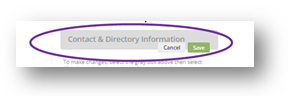
It’s easy to make changes to information in your profile.
- Select the gray header above the information you want to change
- Make the changes
- Select “Save” on the gray header
Some information in your profile is only editable by UUFC staff. If a piece of information is not editable by you, the “Save” and “Cancel” buttons will not appear on the gray bar.
We configured the default to only include people’s contact information who were previously in our old online directory. When you log in, you will see your own profile and your family members’ information. For other congregants, you will only see members and friends who had given us permission to be in the directory.
To share your contact information if it is not already:
- Log in to Breeze
- Select “My Profile”
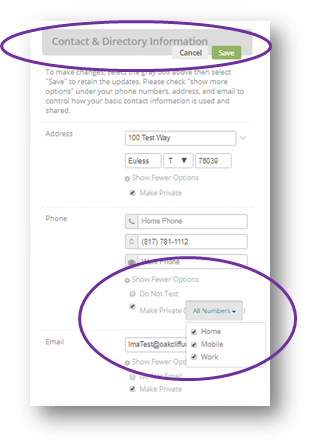
- Select the “Contact & Directory Information” header (gray bar)
- Under Phone, select “Show More Options”
- Use the “Make Private” checkbox to control what will be seen by other logged-in congregants
- If you wish all of your numbers to be visible, simply remove the check in the checkbox
- To select specific numbers, select the checkbox and then use the pull-down menu to select those phone numbers you wish to hide
- Select “Save” on the gray bar
Use the same procedure to make your mailing and email addresses available to other members.